







Best Cameras for YouTube in Pakistan (2026)
Choosing the best camera for YouTube in Pakistan depends on much more than resolution or megapixel count.The right camera needs to match the way you create content, whether you are recording travel vlogs, talking-head videos, product reviews, tutorials, interviews, studio productions, cinematic videos or fast-moving social media content.
In 2026, creators can choose from compact stabilized cameras, dedicated vlogging cameras, APS-C mirrorless systems and professional full-frame cameras. This guide brings those categories together so you can compare the strengths of each option before investing in your YouTube setup.
Choosing the Best Camera for YouTube in Pakistan
Start with your content style, then choose the camera category that supports it.
There is no single camera that is perfect for every YouTuber. A creator who spends most of the day walking through Lahore or traveling around Pakistan has very different requirements from someone recording product reviews in a controlled studio.
A travel vlogger may value compact size and built-in stabilization. A beginner building a home studio may prefer an interchangeable-lens camera with a flip screen and external microphone support. A professional filmmaker may prioritize full-frame image quality, dynamic range, advanced codecs and compatibility with professional lenses and accessories.
That is why this guide does not simply rank cameras from “best” to “worst.” Instead, each recommendation is connected to a particular type of creator and shooting workflow.If you are completely new to interchangeable-lens cameras, you can also read our detailed Best Beginner Mirrorless Cameras in Pakistan guide before making your final decision.
What to Look for in a YouTube Camera
These are the features that matter most in a real creator workflow.
Before comparing individual cameras, it is useful to understand which features actually affect your YouTube production.A camera can have impressive specifications on paper but still be frustrating for a beginner if autofocus is unreliable, the screen cannot face the user, audio connectivity is limited, or the camera becomes uncomfortable to carry.
Reliable Autofocus
Face and eye detection are particularly important for solo creators. Good autofocus allows you to concentrate on speaking and presenting instead of constantly checking whether your face is sharp.
High-Quality Video
4K recording gives creators more detail and provides additional flexibility when cropping or reframing footage during editing. It is especially useful for modern YouTube production workflows.
Flip or Articulating Screen
A screen that can face you is extremely useful when recording yourself. It helps with framing, exposure, composition and positioning during solo shoots.
Stabilization
Stabilization becomes especially important for handheld and walking videos. Depending on the camera, this may come from optical stabilization, IBIS, electronic stabilization or a built-in mechanical gimbal.
External Microphone Support
Built-in microphones are useful for casual recording, but external microphones can provide a significant improvement for interviews, tutorials, reviews and talking-head videos.
Portability
A compact camera is more likely to be carried and used regularly. Travel creators should consider total system weight rather than looking only at the camera body.
Best Overall Vlogging Camera for YouTube: DJI Osmo Pocket 4
A compact all-in-one solution for creators who value portability and stabilization.
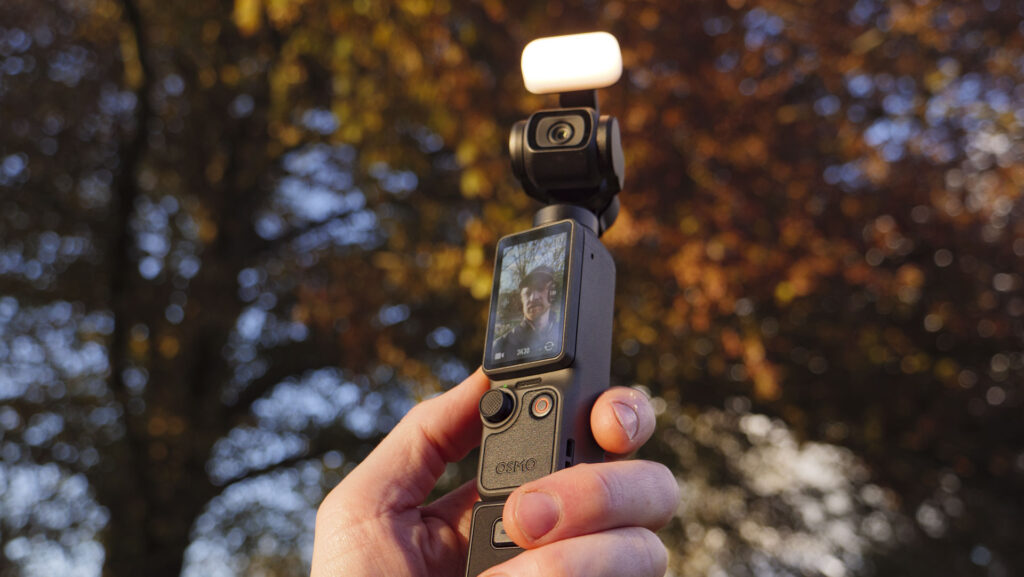
For creators who want a camera that is ready to record without carrying a separate gimbal, the DJI Osmo Pocket 4 is one of the most practical choices in the current creator market.
Unlike a traditional interchangeable-lens camera, the Pocket approach is built around portability and convenience. The camera combines a compact body with integrated three-axis mechanical stabilization, making it particularly useful for walking videos, travel vlogs, city exploration, daily content and handheld storytelling.
DJI Osmo Pocket 4
The Pocket 4 is especially attractive to creators who do not want to build a large camera-and-gimbal setup. Its compact form factor means it can be carried easily, while mechanical stabilization helps produce smoother footage during movement.
This makes it particularly suitable for solo YouTubers, travel creators and beginners who want to spend less time setting up equipment and more time actually recording.
It is also important to understand where a compact stabilized camera differs from a traditional mirrorless system. The Pocket 4 prioritizes convenience and portability, while cameras such as the Sony ZV-E10 II offer interchangeable lenses and a more expandable camera system.
Why the DJI Osmo Pocket 4 Works Well for YouTube
Built-In Stabilization
Mechanical three-axis stabilization makes it particularly convenient for walking and travel footage without adding a separate handheld gimbal to the setup.
Extremely Portable
Its compact design makes it easy to carry throughout the day, which is valuable for creators who record spontaneous or travel-based content.
Simple Creator Workflow
The integrated camera and stabilization system reduces the amount of equipment required before you can start recording.
Want More Options for Vlogging?
The DJI Osmo Pocket 4 is not automatically the right choice for every YouTuber. If you want interchangeable lenses, stronger system expansion and a more traditional camera workflow, the Sony and Canon creator cameras covered in the next sections may be more suitable.
Best Mirrorless Camera for Beginners: Sony ZV-E10 II
A creator-focused interchangeable-lens camera for YouTube, product videos and long-term growth.
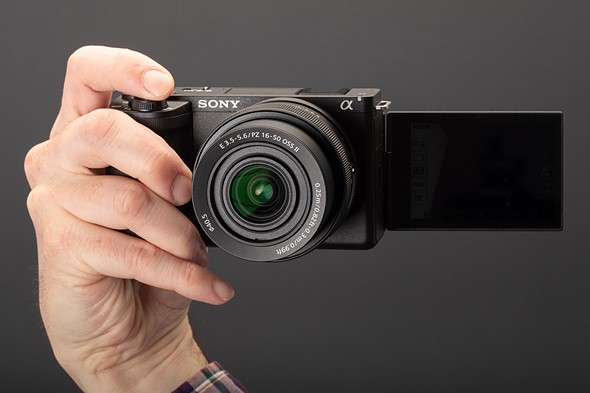
If you liked the portability of the DJI Osmo Pocket 4 in Part A but want more control and room to grow, the Sony ZV-E10 II is a very different type of YouTube camera.
Instead of combining the camera and stabilization system into one compact unit, the ZV-E10 II is built around an interchangeable-lens mirrorless platform. This gives creators the ability to change lenses as their content evolves, experiment with different focal lengths, improve background separation and build a complete camera system around their YouTube workflow.
For beginners who are serious about building a channel rather than simply purchasing a camera for occasional recording, this flexibility can be extremely valuable. You can start with the supplied kit lens and later add a wide-angle lens for vlogging, a fast prime for talking-head videos or a specialized lens for product and cinematic work.
Why the Sony ZV-E10 II Is a Strong YouTube Camera
Designed around the needs of modern creators rather than traditional photography alone.
Sony’s ZV series was developed specifically with content creators in mind. The ZV-E10 II continues that approach by combining interchangeable-lens flexibility with a body designed around video recording and self-filming.
This is particularly useful for YouTubers who record themselves regularly. Instead of treating video as an additional feature on a photography-first camera, the ZV-E10 II provides a workflow that makes creator-oriented shooting more straightforward.
Creator-Focused Autofocus
Reliable face and eye detection helps maintain focus while recording talking-head videos, demonstrations, tutorials and other solo content.
High-Quality 4K Video
4K recording provides the detail needed for modern YouTube production while giving editors additional flexibility when cropping footage.
Interchangeable Lenses
The ability to change lenses allows the camera to grow with your channel and adapt to different types of content.
External Audio Workflow
External microphone support allows creators to move beyond basic built-in camera audio as production requirements increase.
Creator-Oriented Design
The ZV family is designed around vlogging and video creation, making it particularly approachable for creators moving into dedicated camera equipment.
Room to Grow
A lens-based system provides an upgrade path for creators who later need wider, faster or more specialized optics.
Sony ZV-E10 II
The Sony ZV-E10 II is a strong option for creators who want to begin with a relatively straightforward setup but do not want to be restricted to a fixed-lens or compact camera system.
Its interchangeable-lens design is particularly useful for YouTubers because different content styles often require different perspectives. A wide field of view can be useful when filming yourself at arm’s length, while a longer or faster lens can create stronger subject separation for studio presentations, interviews and product videos.
This makes the ZV-E10 II a camera that can evolve alongside a channel. A beginner can start with the kit lens and later expand the system rather than immediately purchasing an expensive professional setup.
What Can You Create With the Sony ZV-E10 II?
Its flexibility makes it suitable for more than traditional vlogging.
YouTube Talking-Head Videos
A suitable lens and controlled lighting can produce clean, professional-looking studio videos for education, commentary, tutorials and regular YouTube publishing.
Product Reviews
Creators reviewing cameras, electronics or other products benefit from dependable autofocus and the ability to change lenses according to the shooting environment.
Travel Content
With an appropriately sized lens, the camera can form a lightweight travel setup while providing more flexibility than a fixed-lens creator camera.
Tutorials & Education
The camera is well suited to educators and trainers who need consistent autofocus and high-quality video for lessons, demonstrations and online courses.
Studio Content
When combined with suitable lighting, microphone and lens choices, the ZV-E10 II can become the center of a capable home or professional YouTube studio.
Reels & Short-Form Video
Creators producing both YouTube videos and short-form vertical content can use the same camera system across multiple platforms.
Building a YouTube Camera System Around the ZV-E10 II
The camera body is only the beginning of a serious creator setup.
One of the biggest advantages of choosing a mirrorless camera for YouTube is the ability to build the system gradually. Beginners do not necessarily need to purchase every accessory on day one.
A practical starting setup can consist of the camera, kit lens, one suitable microphone, a tripod and basic lighting. As your production becomes more demanding, you can add better lenses, wireless audio, stronger lighting, gimbals and additional storage.
Start With the Kit Lens
A kit lens can cover general indoor recording, basic product content and many everyday shooting situations while you learn your workflow.
Improve Audio
Once your camera workflow is established, upgrading the microphone can produce a noticeable improvement in perceived production quality.
Improve Lighting
Consistent lighting helps the camera produce cleaner, more controlled footage and can often make a larger difference than upgrading the camera body.
DJI Osmo Pocket 4 vs Sony ZV-E10 II for YouTube
Both are excellent creator cameras, but they solve different problems.
The choice between the DJI Osmo Pocket 4 and Sony ZV-E10 II should not be based simply on which camera has better specifications. The more useful question is whether you value an integrated, stabilized camera or an expandable interchangeable- lens system.
| Feature | DJI Osmo Pocket 4 | Sony ZV-E10 II |
|---|---|---|
| Design | Compact integrated creator camera | Interchangeable-lens mirrorless camera |
| Stabilization | Built-in mechanical gimbal | Depends on camera, lens and electronic stabilization workflow |
| Lenses | Integrated camera system | Interchangeable lenses |
| Portability | Excellent | Very good with a compact lens |
| Upgrade Potential | Limited to integrated system | High |
| Best For | Travel, walking and spontaneous vlogging | YouTube, studio, product and expandable creator workflows |
Ready to Move Beyond Beginner-Level Gear?
The next step is choosing a camera for more demanding professional content.
If your YouTube channel has grown beyond basic vlogging and you need stronger low-light performance, greater creative control, more advanced video capabilities or a larger full-frame system, the next category to consider is professional mirrorless.
Best Professional Cameras for YouTube in Pakistan
When your channel demands stronger image quality, low-light performance and professional control.
Moving from a beginner camera to a professional YouTube setup is not simply about spending more money. The real reason to upgrade is that your production requirements have changed.If you have already considered the Sony ZV-E10 II discussed in Part B , you already have a capable creator-focused camera. However, larger and more demanding productions may require better low-light performance, stronger dynamic range, greater lens flexibility and more advanced recording capabilities.
This is where full-frame mirrorless cameras become particularly attractive. They provide creators with greater control over the visual character of their footage and can be paired with professional lenses, microphones, lighting systems, monitors, tripods and gimbals to build a much more sophisticated production environment.
Sony A7 III — Proven Full-Frame YouTube Camera
The Sony A7 III remains an attractive option for creators who want to move into full-frame production without immediately entering the highest price segment.
Its full-frame sensor provides creators with the benefits associated with larger-sensor systems, particularly when shooting in challenging lighting conditions or when using fast lenses for stronger subject separation.
For YouTube creators producing interviews, studio videos, documentary-style content, commercial videos and photography alongside video, the A7 III can serve as a versatile hybrid camera.
Sony A7 IV — Best Professional All-Rounder
For creators who want a more modern full-frame platform, the Sony A7 IV is one of the strongest all-round options in this category.
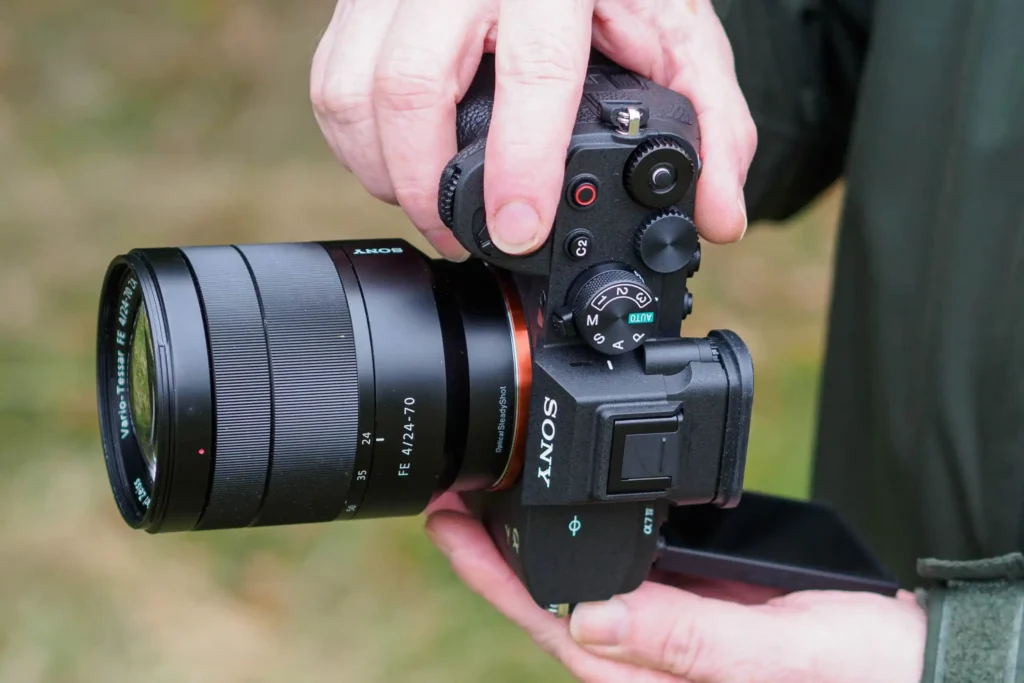
It is particularly appealing to creators who combine YouTube video with photography, commercial projects, interviews, product work and other professional assignments.
The A7 IV can form the foundation of a much larger production system. Pairing it with the appropriate Sony lens, external microphone, professional lighting and camera gimbal can turn it from a simple YouTube camera into a versatile production platform.
Why Professional Creators Move to Full Frame
The advantage is not one specification — it is the complete production workflow.
Better Low-Light Flexibility
Full-frame cameras can provide greater flexibility when shooting indoor interviews, evening scenes, events and other environments where available light is limited.
Stronger Background Separation
Combined with a fast lens, a full-frame camera can create pronounced subject separation that is particularly useful for cinematic talking-head videos and interviews.
Greater Dynamic Range Flexibility
A capable full-frame system gives creators more flexibility when dealing with demanding lighting and scenes containing bright highlights and deep shadows.
Professional Lens Choices
Full-frame systems provide access to a broad range of professional lenses for wide-angle, portrait, telephoto and cinematic applications.
Professional Production
A full-frame camera can integrate into more advanced workflows involving external audio, lighting, monitoring, stabilization and professional accessories.
Hybrid Photography & Video
Creators who earn from both photography and video can use one interchangeable-lens system across multiple types of assignments.
Sony A7 III vs Sony A7 IV for YouTube
Both cameras can serve professional creators, but the newer generation offers a stronger long-term platform.
| Consideration | Sony A7 III | Sony A7 IV |
|---|---|---|
| Positioning | Proven full-frame hybrid | Newer advanced hybrid platform |
| YouTube Use | Professional and semi-professional production | Advanced YouTube and commercial production |
| Low-Light Work | Excellent | Excellent |
| Upgrade Potential | Strong | Stronger long-term platform |
| Best For | Creators seeking full-frame value | Creators building a modern professional system |
If budget is the main consideration, the Sony A7 III can still be an attractive entry into Sony’s full-frame ecosystem. If you want a newer platform with stronger long-term relevance, the Sony A7 IV deserves serious consideration.
Build a Professional YouTube Setup Around Your Camera
A professional camera performs best when the rest of the production system is built around it.
Buying a full-frame camera does not automatically make a YouTube channel look professional. The final result depends on the complete production chain: camera, lens, lighting, audio, stabilization, composition and editing.
Professional Audio
Clean dialogue is essential for interviews, tutorials, podcasts and talking-head videos. Explore shotgun microphones and wireless microphone options for more flexible recording.
Controlled Lighting
Good lighting helps control shadows, skin tones and exposure. Explore Camzon lighting equipment for studio and creator setups.
Camera Stabilization
For moving shots, a dedicated camera gimbal can provide smoother motion and more controlled camera movement. See the Gimbal Price in Pakistan guide for mobile and professional stabilizers.
Fast Storage
High-resolution video requires suitable storage media. Before buying memory cards, review the Complete Memory Card Guide to understand speed classes and camera compatibility.
Stable Camera Support
A sturdy tripod is particularly useful for studio videos, interviews, tutorials and product demonstrations. Explore tripods and supports for a more controlled shooting position.
The Right Lens
The lens often has a greater effect on the visual character of a YouTube setup than upgrading the camera body alone. Choose focal length according to your room, framing and shooting style.
Sony ZV-E10 II vs Full-Frame Sony Cameras
Understanding when a professional upgrade actually makes sense.
| Creator Requirement | Sony ZV-E10 II | Sony A7 III / A7 IV |
|---|---|---|
| Beginner Friendly | Excellent | Good |
| Portability | Excellent | Moderate |
| Lens Flexibility | Excellent | Excellent |
| Full-Frame Look | No | Yes |
| Professional Production | Very Good | Excellent |
| System Cost | Lower | Higher |
This comparison shows why there is no reason for every beginner to immediately purchase a full-frame camera. The Sony ZV-E10 II is already capable of producing high-quality YouTube content.A full-frame upgrade becomes more meaningful when your production requirements justify the additional investment.
Looking for a Different YouTube Camera?
Professional full-frame cameras are not the only route to better content.
If your content requires a smaller and simpler camera, the next option in this guide looks at the Canon EOS R50 and EOS R50 V. These cameras occupy a different position from Sony’s full-frame systems and can be particularly attractive to creators who want simple operation, lightweight equipment and excellent everyday video performance.
## PART D — Canon EOS R50 / EOS R50 V: Best Compact Creator Cameras“`html
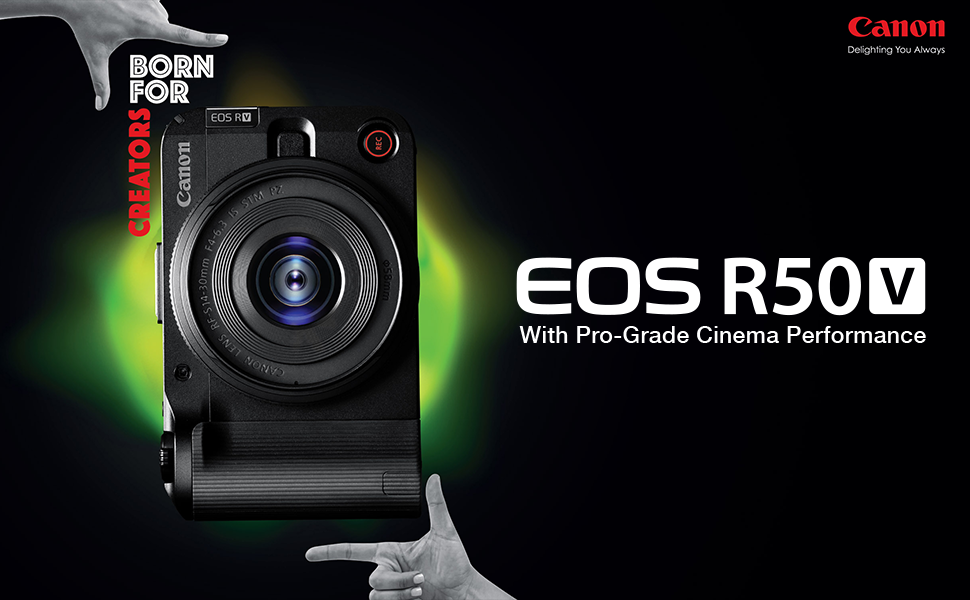
Canon EOS R50 & EOS R50 V — Best Compact Creator Cameras
Simple, lightweight and approachable mirrorless cameras for beginners and growing YouTube creators.
Not every YouTube creator needs to jump directly from an entry-level camera to a full-frame professional system. As discussed in Part C , professional full-frame cameras such as the Sony A7 III and Sony A7 IV can provide impressive capabilities, but they also bring higher system costs, larger lenses and a more demanding workflow.
For beginners who want something between a compact vlogging camera and a professional full-frame system, the Canon EOS R50 and Canon EOS R50 V are particularly interesting options.
Both cameras combine the flexibility of interchangeable lenses with a compact body and beginner-friendly operation. This makes them suitable for creators who want to learn photography and video while building a YouTube setup that can grow over time.
Canon EOS R50 — A Simple Starting Point
The Canon EOS R50 is designed for users who want the benefits of an interchangeable-lens camera without dealing with the size and complexity traditionally associated with larger camera systems.
Its compact design makes it easy to carry for travel, everyday content and casual shooting, while its autofocus system helps beginners achieve consistent focus when recording people and moving subjects.
For YouTube beginners, this combination is important. Instead of spending most of the learning process dealing with complicated settings, creators can concentrate on framing, lighting, storytelling and developing a consistent publishing workflow.
Canon EOS R50 V — Built Around Content Creation
The Canon EOS R50 V takes the compact EOS R50 concept further toward dedicated video and creator workflows.
It is particularly appealing to YouTubers who are primarily interested in video rather than treating video as a secondary feature. The creator-focused design makes it easier to build a dedicated setup for talking-head videos, tutorials, livestreaming, product demonstrations and social media content.
For someone starting a channel today, that distinction can matter. A camera that matches your actual workflow can make recording easier and encourage more consistent content production.
Canon EOS R50 vs EOS R50 V for YouTube
Two compact cameras, but with different creator priorities.
The EOS R50 and EOS R50 V belong to the same compact Canon mirrorless family, but they should not be viewed as identical choices. The standard R50 is a versatile hybrid camera that works well for photography and video, while the R50 V places greater emphasis on creator-oriented video workflows.
| Consideration | Canon EOS R50 | Canon EOS R50 V |
|---|---|---|
| Target User | Beginner hybrid creator | Video-focused creator |
| YouTube | Excellent | Excellent |
| Photography | Strong hybrid capability | More creator/video focused |
| Portability | Excellent | Excellent |
| Beginner Friendliness | Excellent | Excellent |
| Best Match | Photo + YouTube | YouTube + creator production |
Who Should Choose the Canon EOS R50 Series?
These compact cameras are particularly useful for creators who value simplicity and portability.
YouTube Beginners
A straightforward interchangeable-lens camera can help new creators learn video production without immediately investing in a large professional system.
Studio Creators
The compact form factor works well for home studios, tutorials, educational content, reviews and talking-head videos.
Product Review Channels
Creators can build a flexible lens setup for product demonstrations, close-up shots, unboxing videos and presenter-led content.
Travel Creators
The lightweight body makes the camera easier to carry during travel while retaining the flexibility of an interchangeable-lens system.
Teachers & Educators
Tutorials, online courses, presentations and instructional videos can benefit from reliable autofocus and a dedicated camera workflow.
Hybrid Creators
The EOS R50 is particularly attractive to users who want one compact system for photography, YouTube and everyday creative work.
Canon EOS R50 V vs Sony ZV-E10 II for YouTube
Two beginner-friendly creator systems with different strengths.
By this point in the guide, you have seen the Sony ZV-E10 II and now the Canon EOS R50 family. Both are excellent choices for beginners, but the decision should be based on the overall system rather than the camera body alone.
| Feature | Canon EOS R50 V | Sony ZV-E10 II |
|---|---|---|
| Primary Focus | Creator/video | Creator/video |
| Lens System | Canon RF mount | Sony E mount |
| Beginner Friendliness | Excellent | Excellent |
| Photography + Video | Very good | Very good |
| Creator Ecosystem | Growing Canon RF ecosystem | Mature Sony E-mount ecosystem |
| Best For | Canon users and video-first beginners | Creators wanting a broad E-mount upgrade path |
If you already own Canon RF equipment or prefer Canon’s handling and color rendering, the EOS R50 family can be a natural choice. If you want access to the extensive Sony E-mount ecosystem and a camera built specifically around the ZV creator philosophy, the Sony ZV-E10 II is worth considering.
Build a Complete YouTube Setup Around the EOS R50
Camera quality is only one part of the final video.
A compact camera becomes considerably more useful when combined with the right accessories. Beginners should avoid buying everything at once and instead build the setup according to their actual content requirements.
Add Better Audio
For talking-head videos and tutorials, a suitable external microphone can make dialogue cleaner and easier to understand.Explore audio equipment for creator workflows.
Improve Your Lighting
Good lighting helps maintain consistent exposure and creates a more polished appearance.Explore Camzon lighting equipment for studio and creator setups.
Use a Stable Tripod
A tripod is essential for tutorials, interviews, product demonstrations and fixed-position YouTube recording.Browse tripods and supports .
Choose Suitable Storage
High-quality video creates large files, so reliable memory cards are an important part of a YouTube workflow.See the Complete Memory Card Guide before buying storage.
Canon EOS R50 or R50 V: Which One Should You Buy?
Match the camera to your actual content workflow.
Choose EOS R50 If…
You want a compact camera that can handle both photography and YouTube video, prefer a simple learning curve and want an affordable entry into the Canon RF mirrorless system.
Choose EOS R50 V If…
Your primary purpose is video creation and you want a camera positioned specifically around the needs of YouTubers, vloggers and other content creators.
Consider Sony ZV-E10 II If…
You prefer Sony’s creator ecosystem and want an interchangeable-lens camera with a strong long-term upgrade path for video production.
Choose DJI Pocket 4 If…
You value maximum portability, integrated mechanical stabilization and a simple all-in-one vlogging workflow more than interchangeable lenses.
Want Something More Creative Than a Traditional Camera?
The next section explores 360-degree cameras for unconventional YouTube content.
Traditional mirrorless cameras are excellent for talking-head videos, tutorials and professional productions, but YouTube creators are increasingly using specialized cameras to create more dynamic and immersive content.If your channel involves travel, motorcycles, action, adventure, behind-the-scenes footage or creative storytelling, a 360-degree camera can offer a completely different approach.
Insta360 X5 — Best for Creative & Action YouTube Content
A different approach to YouTube filmmaking through 360° capture, reframing and immersive storytelling.
Not every YouTube channel needs a conventional mirrorless camera. As we discussed in Part D , cameras such as the Canon EOS R50 V are excellent for talking-head videos, tutorials, product reviews and traditional creator workflows.
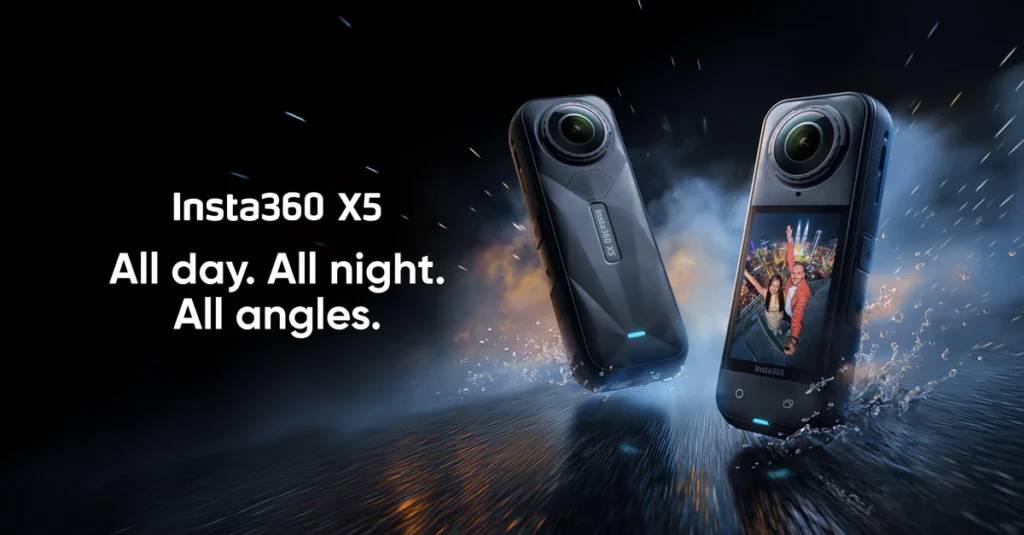
But creators working in travel, motorcycles, adventure, outdoor exploration, action sports and dynamic storytelling often need something different. This is where the Insta360 X5 becomes particularly interesting.
Instead of forcing you to decide exactly where the camera should point before recording, a 360° camera captures the surrounding scene so that you can decide the final framing later during editing. This creates a completely different shooting philosophy from a traditional mirrorless camera.
What Makes the Insta360 X5 Different?
It is not simply another compact action camera.
A traditional camera records the direction in which its lens is pointed. A conventional action camera gives you a wide field of view, but you still need to position it carefully before filming.The Insta360 X5 takes a different approach by recording a 360-degree view around the camera.
This makes it particularly useful when the action is unpredictable or when the camera needs to remain in a fixed position while the creator moves around it. During post-production, the creator can choose the viewpoint, follow subjects and create different compositions from the same recorded material.
Capture Everything
Record the surrounding environment rather than committing to a single camera direction before filming.
Reframe Later
Choose the most useful viewing angle during editing instead of repeating a shot because the framing was wrong.
Create More Perspectives
One recording can be transformed into multiple creative viewpoints for different parts of a YouTube video.
Who Should Consider the Insta360 X5 for YouTube?
Its strengths become most obvious in dynamic and unpredictable shooting environments.
Travel Vloggers
Capture yourself and the surrounding environment while walking through markets, streets, mountains, attractions and unfamiliar locations.
Action Creators
The 360° perspective is useful when the direction of movement changes frequently and conventional framing is difficult.
Motorcycle Content
Mount the camera to a motorcycle or other moving platform and decide the final viewing angle later during editing.
Adventure Channels
Outdoor creators can capture immersive environments while spending less time worrying about precise camera framing.
Behind-the-Scenes Content
A single camera position can capture a much wider view of production environments, events and creator workflows.
Creative YouTubers
Reframing and unusual camera perspectives can help channels develop a visual style that looks different from standard talking-head content.
Why 360° Capture Can Be Powerful for YouTube
The real advantage is not just the camera — it is the workflow.
YouTube creators frequently lose good footage because the camera was pointed slightly in the wrong direction. This can happen during travel, action scenes, demonstrations and spontaneous moments.
A 360° camera changes the workflow by moving part of the framing decision from the shooting stage to post-production. Instead of constantly asking whether the subject is inside the frame, the creator can capture the complete environment and determine the final perspective later.
This can be especially useful for solo creators who do not have a dedicated camera operator. The camera can remain mounted while the creator concentrates on the activity itself.
Insta360 X5 vs Mirrorless Camera for YouTube
These cameras solve different problems rather than simply competing on specifications.
| Shooting Requirement | Insta360 X5 | Mirrorless Camera |
|---|---|---|
| Traditional Talking Head | Possible, but not its primary strength | Excellent |
| Travel | Excellent | Excellent |
| Action | Excellent | Excellent with suitable setup |
| Reframing After Recording | Major advantage | Limited to recorded framing |
| Lens Flexibility | Fixed integrated camera system | Interchangeable lenses |
| Low-Light / Cinematic Workflow | Specialized workflow | Generally stronger choice |
| Solo Shooting | Excellent | Excellent with suitable setup |
This is why the Insta360 X5 should not necessarily be viewed as a replacement for a camera such as the Sony A7 IV or Canon EOS R50 V .For many creators, it makes more sense as a complementary camera that adds perspectives a conventional camera cannot easily produce.
Creative YouTube Shots You Can Create with a 360° Camera
The X5 opens up shooting techniques that are difficult with conventional cameras.
Invisible-Pole Style Shots
A suitably positioned 360° camera can create unusual perspectives that make the camera support appear almost invisible in the finished composition.
Dynamic Follow Shots
Capture a moving scene first and decide later which direction should become the primary viewpoint.
Immersive Travel
Record environments from every direction to give viewers a stronger sense of place and movement.
Production Footage
Use a fixed camera to capture a wider view of shoots, events, workshops and behind-the-scenes activities.
Multiple Reframed Clips
A single 360° recording can potentially provide several useful perspectives during the editing process.
First-Person Experiences
Create engaging first-person perspectives for travel, cycling, motorcycling, adventure and outdoor channels.
Insta360 X5 Price in Pakistan & Bundle Options
Choose the bundle according to the accessories your shooting style actually requires.
The Insta360 X5 is available in different packages, allowing creators to select a configuration based on their intended use.
Base Version
Around PKR 155,000 based on the pricing supplied for this guide. Suitable for creators who already own compatible accessories or want to build their setup gradually.
Motorcycle Bundle
Around PKR 175,000. A more suitable starting point for creators planning motorcycle and moving-platform content.
Essential Bundle
Around PKR 185,000. Useful for creators who want a more complete starting package rather than purchasing accessories separately.
Insta360 X5 vs Traditional Action Cameras
Choose based on whether you need conventional framing or maximum creative flexibility.
A conventional action camera is often the better choice when you already know exactly what you want to capture and need a simple, forward-facing wide-angle recording workflow.
A 360° camera becomes more attractive when the action can happen in any direction, when you are filming yourself, or when you want to make framing decisions after the shoot.
If you are still deciding between different types of action and creator cameras, continue with our Best Action Cameras in Pakistan guide for a broader comparison of options for travel, vlogging and adventure content.
Build a Complete Insta360 YouTube Workflow
The camera is only the starting point.
360° footage can create large files and requires a sensible storage and editing workflow. Creators should therefore think beyond the camera itself when building a production setup.
High-Speed Memory Cards
Reliable storage is essential when recording high-resolution video. See our complete memory card guide before choosing a card.
Better Audio
Even impressive visuals cannot compensate for poor sound. Explore microphones and audio equipment for a more complete creator workflow.
Mounting & Support
The right support system makes a major difference for travel, action and fixed-position 360° shots.Browse tripods and supports .
Editing Workflow
Reframing is one of the biggest creative advantages of 360° video, so make sure your editing workflow can handle the footage efficiently.
Is the Insta360 X5 the Right YouTube Camera for You?
The answer depends on the type of stories you want to tell.
If your channel mainly consists of studio presentations, tutorials, product reviews or traditional talking-head videos, a compact mirrorless camera such as the Canon EOS R50 V or Sony ZV-E10 II may be a more natural primary camera.
If your content revolves around travel, action, motorcycles, adventure, outdoor exploration or creative camera movements, however, the Insta360 X5 offers a completely different level of shooting flexibility.
Next: DSLR vs Mirrorless for YouTube
Before choosing your final camera, it is important to understand which camera system makes the most sense for long-term YouTube production.
The cameras covered so far serve different creator needs: the DJI Osmo Pocket 4 prioritizes portability, the Sony ZV-E10 II provides an interchangeable-lens creator platform, Canon’s EOS R50 family emphasizes simplicity, and the Insta360 X5 brings 360° creativity to the workflow.
The next part brings these choices into a broader system-level comparison by looking at DSLR vs mirrorless cameras for YouTube and explaining why most new creators are now considering mirrorless systems first.
“`html
DSLR vs Mirrorless for YouTube: Which Camera System Should You Choose?
Your camera system should match the way you create content, not simply the number of features listed on the specification sheet.
For most creators starting a YouTube channel in Pakistan in 2026, a modern mirrorless camera is generally the more practical choice. Mirrorless systems combine compact bodies, advanced autofocus, high-quality 4K video, electronic viewfinders, modern lens mounts and increasingly sophisticated subject tracking.
DSLRs are still capable cameras and can represent excellent value, particularly for photographers who already own compatible lenses or are purchasing used equipment. However, if you are building a completely new system primarily for YouTube and video production, the direction of current camera development makes mirrorless a more future-focused option.
Choose Mirrorless If You Create Video First
- Advanced face and eye autofocus
- Better continuous subject tracking
- Compact and lightweight camera bodies
- Modern 4K video features
- Flip and vari-angle screens on many creator cameras
- Strong compatibility with modern creator lenses
Consider DSLR If Photography Is Your Priority
- Excellent battery endurance
- Large selection of affordable used lenses
- Traditional optical viewfinder experience
- Excellent value on the second-hand market
- Strong choice for photography-focused beginners
Which Camera Should You Choose for YouTube in Pakistan?
The best YouTube camera depends on your shooting environment, experience, portability requirements and long-term content plans.
There is no single camera that is perfect for every YouTuber. A travel vlogger may value portability and built-in stabilization, while a studio creator may prefer interchangeable lenses, external audio and stronger low-light performance.
Use the following recommendations as a starting point, then open the relevant product page to compare the camera with your actual workflow.
Sony ZV-E10 II
A creator-focused interchangeable-lens camera for beginners who want to start with a dedicated YouTube camera and have room to upgrade lenses later.
View Sony ZV-E10 II →Canon EOS R50
A compact and beginner-friendly mirrorless camera offering an intuitive shooting experience for YouTube, tutorials, lifestyle videos and hybrid content.
View Canon EOS R50 →DJI Osmo Pocket 4
An excellent choice for creators who want a highly portable camera with integrated mechanical stabilization for walking, travel and everyday vlogging.
View DJI Osmo Pocket 4 →Sony A7 IV
A full-frame hybrid camera for creators who need stronger low-light performance, advanced video capabilities, interchangeable lenses and room for professional production.
View Sony A7 IV →Insta360 X5
A specialized 360-degree camera for creators who want immersive footage, creative reframing and unusual perspectives for travel and action content.
View Insta360 X5 →Explore Cameras for YouTube in Pakistan
Compare different camera categories before deciding which system fits your channel.
Your YouTube camera does not necessarily have to be a traditional mirrorless camera. Depending on your content, an action camera, compact stabilized camera or interchangeable lens system may be a better solution.
Best Cameras for YouTube in Pakistan – Comparison
A quick overview of the cameras discussed in this guide and the type of creator each one is best suited to.
| Camera | Best For | Video Focus | Stabilization | Experience |
|---|---|---|---|---|
| DJI Osmo Pocket 4 | Travel & vlogging | 4K creator video | Built-in 3-axis gimbal | Beginner–Intermediate |
| Sony ZV-E10 II | YouTube creators | 4K mirrorless video | Electronic / lens dependent | Beginner–Intermediate |
| Canon EOS R50 V | Beginner creators | 4K creator video | Digital / lens dependent | Beginner |
| Sony A7 IV | Professional YouTube | 4K / 10-bit | IBIS | Advanced |
| Insta360 X5 | Creative & action content | 360-degree video | Electronic stabilization | All levels |
Complete YouTube Setup for Beginners in Pakistan
A camera is only one part of a successful YouTube production setup.
Beginners often concentrate almost entirely on camera specifications, but a YouTube setup works as a complete production chain. The camera captures the image, the microphone captures the voice, lighting shapes the subject, and the tripod or stabilizer keeps the composition controlled.
A balanced setup is usually a better investment than spending the entire budget on the camera body and leaving no room for audio, lighting or support equipment.
Camera
Start with a creator-focused camera such as the Sony ZV-E10 II or Canon EOS R50 .
Microphone
Clear speech is critical for YouTube. Use a suitable wireless, lavalier or shotgun microphone depending on your shooting environment. Explore the shotgun microphone collection for camera-mounted audio solutions.
Tripod & Camera Support
A stable tripod is particularly important for tutorials, product reviews, educational videos, interviews and studio-based YouTube content. Explore tripods and supports for different shooting requirements.
Lighting
Good lighting can transform an otherwise ordinary camera into a much more professional-looking setup. Explore lighting and studio equipment for continuous LED and creator lighting solutions.
Final Thoughts: Choosing the Best Camera for YouTube in Pakistan
Choosing the best camera for YouTube in Pakistan is ultimately about matching the camera to your content rather than simply buying the most expensive model you can afford.
Beginners who want a straightforward interchangeable-lens setup should consider cameras such as the Canon EOS R50 or Sony ZV-E10 II . These cameras provide a strong foundation for learning photography and video while allowing creators to expand their system with different lenses and accessories.
Creators who travel frequently or record walking and handheld content may prefer the integrated stabilization and compact design of the DJI Osmo Pocket 4 . It removes much of the equipment complexity associated with a traditional camera-and-gimbal setup.
More advanced YouTubers and commercial creators may benefit from moving to a full-frame system such as the Sony A7 IV when they need greater control over lenses, low-light shooting and professional video production.
If your content depends on unusual perspectives, immersive footage or action storytelling, a specialized camera such as the Insta360 X5 can provide creative possibilities that a conventional camera cannot easily reproduce.
Ready to Build Your YouTube Setup?
Explore cameras, microphones, tripods and lighting at Camzon and build your equipment around the way you actually create.
Frequently Asked Questions About YouTube Cameras in Pakistan
Practical answers to common questions beginners ask before buying their first YouTube camera.
Which is the best camera for YouTube beginners in Pakistan?
The Sony ZV-E10 II and Canon EOS R50 are strong choices for beginners because they combine interchangeable lenses, dependable autofocus, high-quality video and relatively straightforward operation.
Is a DSLR still good for YouTube in 2026?
Yes. A DSLR can still produce excellent YouTube content, particularly for photography-focused users and creators who already own DSLR lenses. However, modern mirrorless cameras generally provide a stronger combination of autofocus, portability and video-focused features for a new YouTube setup.
What is the best budget camera for YouTube in Pakistan?
The right budget option depends on current pricing and availability. Entry-level mirrorless models such as the Canon EOS R50 can provide an excellent starting point, while older creator-focused cameras may offer good value when available. Always compare the complete camera kit rather than the body price alone.
Do I need 4K for YouTube videos?
You do not strictly need 4K because YouTube supports lower-resolution uploads, but 4K is highly useful for creators who want more detail, cropping flexibility and a longer-lasting production workflow. It also gives editors more flexibility when reframing footage for different platforms.
Can I start YouTube with a smartphone instead of a camera?
Absolutely. A smartphone can be an excellent starting point, particularly when learning scripting, presentation, editing and publishing. A dedicated camera becomes valuable when you need better lens flexibility, low-light performance, depth-of-field control or a more specialized video workflow.
Which camera is best for vlogging in Pakistan?
For creators who prioritize portability and stabilized walking footage, the DJI Osmo Pocket 4 is a particularly convenient option. For interchangeable-lens vlogging, consider creator-focused mirrorless cameras such as the Sony ZV-E10 II or Canon EOS R50.
What is more important for YouTube: camera or microphone?
Both matter, but poor audio can make otherwise excellent video difficult to watch. A good microphone should therefore be considered an essential part of the setup, particularly for talking-head videos, interviews, tutorials and educational content.
Sony vs Canon for YouTube — which is better?
Both brands offer excellent options. Sony is particularly strong in autofocus and creator-oriented video features, while Canon is widely appreciated for its intuitive operation and attractive color rendering. The best choice depends on your preferred workflow, lens requirements and budget.
What accessories do I need for YouTube videos?
A practical beginner setup normally includes a camera, microphone, tripod and lighting. Depending on your workflow, you may also need memory cards, spare batteries, camera bags, filters, gimbals and additional lenses.
For storage requirements, see our Complete Guide to Memory Cards in Pakistan .
What is the best YouTube setup in Pakistan for beginners?
A sensible beginner setup can start with a Canon EOS R50 or Sony ZV-E10 II, a suitable microphone, a stable tripod and a simple LED light. The goal should be to create a reliable workflow without spending the entire budget on the camera.
As your channel grows, you can gradually add better lenses, wireless audio, lighting, stabilization and other accessories according to the limitations you actually encounter.
.


One thought on “Best Cameras for YouTube in Pakistan (2026) | Top Vlogging Cameras”